7 apps, prices and features checked October 28, 2026

Best blood sugar log apps without a CGM (2026)

Short answer

You don't need a CGM to keep a good blood sugar log. Every app below lets you type in readings from a finger-prick meter. If your meter syncs by Bluetooth, start with that meter's app: mySugr for Accu-Chek, OneTouch Reveal for OneTouch, MedM for 50+ other models. If you'd rather type the number in and keep it simple, with no account and no ads, look at Glucose Log.

Disclosure: we make Glucose Log, one of the seven apps on this page. Everything we say about other apps comes from their App Store and Google Play pages and their own help pages, checked on the date above. Prices are US App Store prices.

Quick picks

Start from your meter and from what you want to track. There is no single best app; there is the one that fits how you check.

Comparison table

All seven apps are free to download on iPhone and Android and let you enter readings by hand. The table shows what differs.

Checked October 28, 2026. Prices: US App Store. Ads: the "Contains ads" label on Google Play. Prices and features change; check the store page before you buy.
AppPriceAccountAdsMeter syncDoctor report
Glucose LogIskandar IskhakovOur app Free; Pro $29.99/yr or $9.99/mo Not needed No ads Any meter, by handImports from Apple Health, Health Connect or a OneTouch Reveal CSV With ProPDF and CSV
mySugrmySugr GmbH (Roche) Free; PRO $4.99/mo or $39.99/yr Required Contains ads Accu-Chek metersInstant, Guide, Aviva Connect, Performa Connect; Apple Health With PROPDF and Excel
OneTouch RevealLifeScan Free; no in-app purchases Required, 18+ No ads OneTouch Bluetooth meters YesSent by email
MedM Blood Sugar DiaryMedM Free; Premium $5.99/mo, $35.99/yr or $99.99 lifetime Optional No ads 50+ Bluetooth meter models YesReport export
Diabetes:MSirma Medical Systems Free; Premium $4.99/mo to $49.99/yr OptionalNeeded for cloud and server features Contains adsRemoved with Premium Some Bluetooth metersApple Health; imports from meter and pump software With PremiumPDF and XLS
Glucose BuddyAzumio Free; Premium, monthly or yearly$14.99 to $59.99 listed Required Contains ads iPhone: Dexcom, AgaMatrix Jazz Wireless 2 (US)Apple Health on iPhone. Android app last updated July 2024 YesPDF; custom reports with Premium
GlucobyteEvolve Medical Systems Free; Premium from $5.99/week, lifetime $89.99 OptionalFor cloud backup Contains adsAd-free lifetime option Bluetooth meters and Apple Health YesPDF

"Optional" account: you can log without signing up; an account adds cloud backup or sharing. Every app here also works with any meter if you type the number in.

302
paywall
216
ads
143
account

Why we compare these columns. We read 2,317 app store reviews of 28 diabetes apps. The most common complaints were paywalls and subscriptions (302 reviews), ads (216), and required accounts or privacy worries (143). The most praised quality was "simple and easy to use" (170 reviews, 4.7 stars on average).

App by app

Each app in a few lines: who it suits, and what to know before you install it.

Glucose Log: Blood Sugar Diary

Our app · iPhone, iPad and Android

Best for

A simple, fast diary for readings you take with any meter: type the number in two taps, tag it fasting, before or after a meal, or bedtime, and add a note. Charts and insights show patterns over days and weeks. For type 1, type 2, gestational diabetes and prediabetes.

What you get

  • No account and no ads. Your data stays on your phone.
  • Free: full history, charts, insights, averages, reminders, import and encrypted backup.
  • Pro: PDF and CSV reports for your doctor, time in range, A1C estimate and stats for 3 months and longer.
  • mg/dL and mmol/L, in 6 languages.
  • Regular updates on iPhone and Android.

Good to know: no direct Bluetooth meter sync. Type readings in, or import them from Apple Health, Health Connect or a CSV file. Food, carbs and insulin go in the note on each reading.

mySugr

mySugr GmbH, part of Roche · iPhone and Android

Best for

Accu-Chek meter owners: readings from connected Accu-Chek meters go into the log automatically. Also logs carbs, meals and medication. With PRO, a bolus calculator in some countries.

Good to know

  • You create a mySugr account at setup.
  • PDF and Excel reports are part of PRO: $4.99/month or $39.99/year.
  • Google Play lists "Contains ads".

OneTouch Reveal

LifeScan · iPhone and Android

Best for

OneTouch Bluetooth meter owners. The app syncs readings from the meter, color-codes them and shows patterns alongside food, insulin and activity. You can email a report to your care team.

Good to know

  • Free, with no in-app purchases.
  • Needs a OneTouch Reveal account; you must be 18 or older, or a guardian can set it up for you.
  • Built around OneTouch meters.

Blood Sugar Diary for Diabetes (MedM)

MedM · iPhone and Android

Best for

Bluetooth meters from many brands: the store page lists over 50 connected meters. Logs 14 types of measurements. Premium adds sync with Apple Health and other services and sharing with family or caregivers.

Good to know

  • Works with or without registration; cloud backup is optional.
  • Premium: $5.99/month, $35.99/year or $99.99 lifetime.
  • Google Play shows no ads.

Diabetes:M

Sirma Medical Systems · iPhone and Android

Best for

Detailed tracking, especially with insulin: glucose, carbs, food, insulin doses, with reports, charts and statistics. Can import data from meter and pump software and connect to some Bluetooth meters in the EU and US.

Good to know

  • Works without an account; registration adds cloud storage and server features.
  • The free version shows ads. Premium removes them and adds PDF and XLS reports: $4.99/month up to $49.99/year.

Glucose Buddy

Azumio · iPhone and Android

Best for

Logging glucose together with meals: a food database for carbs, plus medication, insulin, weight and activity. On iPhone, syncs with Dexcom, the AgaMatrix Jazz Wireless 2 meter (US) and Apple Health. Creates PDF reports.

Good to know

  • Premium adds an A1C calculator, advanced graphs and custom reports; the App Store lists Premium prices from $14.99 to $59.99.
  • Google Play lists "Contains ads".
  • A login is required (Healthify NZ app review).
  • The Android app was last updated in July 2024. More in Glucose Buddy alternatives.

Glucobyte

Evolve Medical Systems · iPhone, also on Android

Best for

iPhone users who want glucose next to food and more: insulin, medication, ketones, carbs and weight, a food search by barcode or camera, Apple Health sync and Bluetooth meters.

Good to know

  • Cloud backup is optional.
  • Premium comes in many options, from $5.99/week to $89.99 for ad-free lifetime.
  • Google Play lists "Contains ads".

How to choose a log app without a CGM

Prefer paper? That works too. Download a free printable blood sugar log with sheets for gestational diabetes, a week or a month, in mg/dL or mmol/L.

Why we built Glucose Log

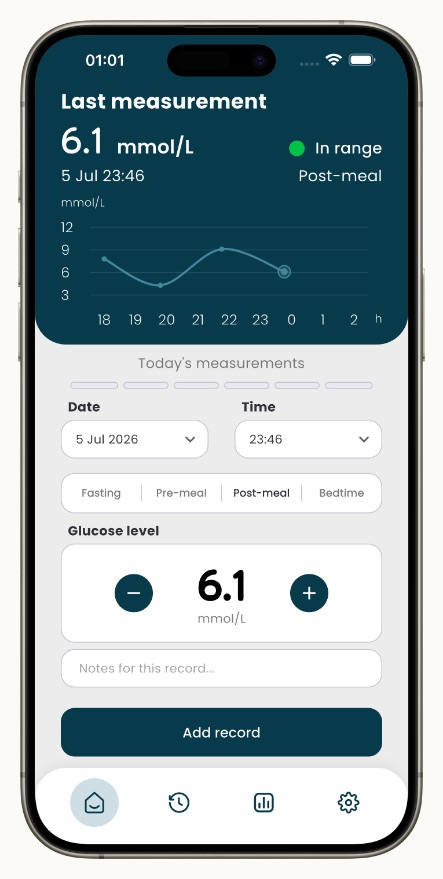
Glucose Log home screen: you enter a glucose reading from your meter by hand, choose fasting, pre-meal, post-meal or bedtime, and add a note
Glucose Log: Blood Sugar DiaryiPhone, iPad and Android

Glucose Log is a simple blood sugar diary for type 1, type 2, gestational diabetes and prediabetes. Many diabetes apps are built around sensors, accounts and food databases. We wanted a log for people who check with a meter and just need to write the number down: two taps, a tag, a note if you like. It does not measure blood sugar.

Your full history, charts, insights and reminders are free. Pro adds PDF and CSV reports for your doctor, time in range, an A1C estimate and long-term stats.

  • No account
  • No ads
  • mg/dL and mmol/L
  • 6 languages

Updated regularly on iPhone and Android. What we add next comes from people who use the app: tell us what you need.

Free to download; some features need a Pro subscription.

Questions

Do I need a CGM to use a blood sugar app?

No. Every app on this page lets you type in readings from a finger-prick meter. Some can also get readings from a Bluetooth meter or from Apple Health. Whether you need a CGM is a question for your care team.

Which blood sugar app works with any glucose meter?

Any app with manual entry: you check with your meter and type the number in. Automatic sync works only with specific meters, such as Accu-Chek meters in mySugr, OneTouch meters in OneTouch Reveal, or the 50+ models listed by MedM.

Is there a blood sugar log app with no ads and no account?

Of the seven apps we checked, Google Play shows no ads for Glucose Log, OneTouch Reveal and MedM. Glucose Log needs no account, MedM works with or without registration, and OneTouch Reveal requires an account.

Can I log my blood sugar for free?

Yes. All seven apps are free to download and let you log readings without paying. Paid plans add things like reports, meter sync or longer statistics. A paper log is free too.

What should I write down with each reading?

The number, the date and time, and when you checked: fasting, before or after a meal, or at bedtime. A short note about food, medication or activity helps you and your doctor see patterns. Ask your care team how often to check and what your targets are.

Can a phone app measure blood sugar by itself?

No. You need a meter or a CGM to get a reading; an app keeps the log. More in Can a phone app measure blood sugar?

How we checked

On October 28, 2026 we read each app's US App Store and Google Play pages: description, in-app purchase prices, the "Contains ads" label and App Privacy. Where a store page didn't say whether an account is needed, we used the maker's help pages or an independent app review. No app maker paid to appear here. We recheck this page every month; if something is out of date, write to support@glucoselog.app.

This page is general information, not medical advice. App names are trademarks of their owners and are used only to identify the apps. Talk to your care team about how often to check and which device is right for you.