Why a phone can't measure blood sugar
To measure glucose, a device has to reach your blood or the fluid just under your skin. A meter does this with a drop of blood on a test strip. A CGM does it with a tiny sensor that sits under the skin. A phone has neither: its camera, flash and touchscreen never touch your blood.

Camera and touchscreen apps
A phone camera can pick up your pulse from your fingertip. That is how heart-rate apps work. Blood sugar is different: an app that shows a glucose number this way is not a substitute for a meter or a CGM.
Smartwatches and smart rings
The FDA warns not to use them to measure blood sugar: none is authorized to do it on its own, and a wrong number can lead to a wrong insulin dose. A watch that shows CGM readings is different: the CGM does the measuring.
People expect it, and it goes badly. We read 2,317 app store reviews of 28 diabetes apps. 82 of them came from people who downloaded an app expecting it to measure their blood sugar, found it was a log, and felt misled. They rated those apps 1.6 stars on average.
What actually measures blood sugar
| Finger-prick meter (glucometer) | Continuous glucose monitor (CGM) | |
|---|---|---|
| How it measures | A drop of blood from your fingertip on a test strip | A small sensor worn on your arm or belly, under the skin |
| How often | Each time you check | Automatically, every few minutes |
| Where you see it | On the meter screen. Some meters also send readings to a phone app | In the sensor's app on your phone, or on a reader |
| Prescription in the US | Not needed | Usually needed. Since 2024 some CGMs are sold over the counter to adults who don't use insulin |
| Ongoing cost | Test strips and lancets | A new sensor every 1 to 2 weeks |
Which one you need, and how often to check, is up to your care team.
What your phone can do
Show CGM readings
The sensor measures; its app on your phone displays the numbers, graphs and alerts.
Receive readings from a meter
Some meters send each result to an app over Bluetooth.
Keep a log
You check with your meter, then type the number into an app or onto paper. The CDC notes that most meters save results, some use a phone app, and a written record works if you prefer not to use a phone.
Remind you and show patterns
Reminders to check, and charts that help you spot patterns, such as high readings after the same meal.
How to spot a fake blood sugar app or device
- It promises a reading without a meter, test strip or sensor: a finger on the camera, a finger on the screen, a "scan", or a watch or ring.
- It promises "no more finger pricks" from a watch, ring or phone alone.
- The ad promises a measurement, but the store description says the number is "for reference" or "for entertainment".
- It is sold only through ads or online marketplaces and names no FDA clearance.
Used one already? Don't change your diet or medication based on its numbers. Check with a real meter and talk to your care team. In the US you can report a problem with a device to the FDA through MedWatch, and you can report a misleading app in the App Store or Google Play.
Where Glucose Log fits
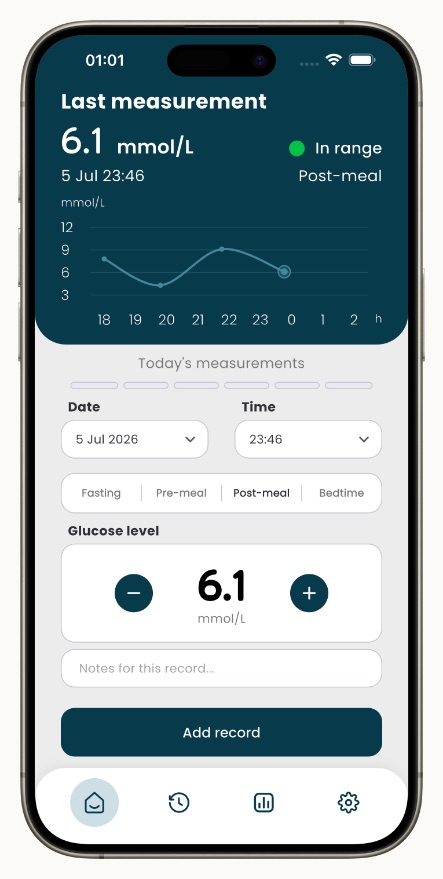

Glucose Log is a simple blood sugar diary for type 1, type 2, gestational diabetes and prediabetes. It does not measure blood sugar. You check with your meter or CGM, then log the number in two taps, with a note if you like. You can also import readings from Apple Health or Health Connect.
It keeps your full history, shows charts, insights and averages, reminds you to check, backs up your data with encryption, and can show time in range, an A1C estimate and a PDF report for your doctor.
- No account
- No ads
- mg/dL and mmol/L
- 6 languages
Free to download; some features need a Pro subscription. Prefer paper? Get a free printable blood sugar log.
Questions
Can I test my blood sugar using my phone's camera?
No. A phone camera can read your pulse, but not your blood sugar. Apps that show a glucose number after you place a finger on the camera are not a reliable way to check. Use a meter or a CGM.
Is there an app to check blood sugar without pricking your finger?
Not an app on its own. A CGM measures with a sensor under the skin, so you prick your finger far less often, and its app shows the readings on your phone. Your care team will tell you when a finger-prick check is still needed.
Can I check my blood sugar with my phone for free?
No. You need a meter with test strips, or a CGM. Logging the readings can be free: paper logs are free, and many apps, including Glucose Log, are free to download.
Can a smartwatch measure blood sugar?
No. The FDA has not authorized any smartwatch or smart ring that measures blood sugar on its own. A watch can show readings from a CGM, but the CGM does the measuring.
Can I check my A1C with my phone?
No. A1C is a blood test done at a clinic, at a lab or with a home A1C kit. Some apps, including Glucose Log, show an estimate calculated from your logged readings (GMI), but it is not a lab A1C.
Do blood sugar apps actually work?
As logs, yes. They don't measure anything, but they make it easier to record readings, see averages and patterns, and share them with your doctor. Apps paired with a CGM or a Bluetooth meter get readings from that device.
Sources
- FDA: Do Not Use Smartwatches or Smart Rings to Measure Blood Glucose Levels (February 21, 2024)
- FDA: FDA Clears First Over-the-Counter Continuous Glucose Monitor (March 5, 2024)
- CDC: Monitoring Your Blood Sugar
This page is general information, not medical advice. Talk to your care team about how to check your blood sugar and what device is right for you.